How do I read the SEO Results page?
On this page
SEO Results, the second tab of Audit, shows what to fix on your site, most costly first. The top strip gives your health score and the key counts, with what changed since your last scan. Below it, every finding sits in one of three groups, ready to open, fix, track and tick off. Further down are the pages Google may see as low value and the raw export.
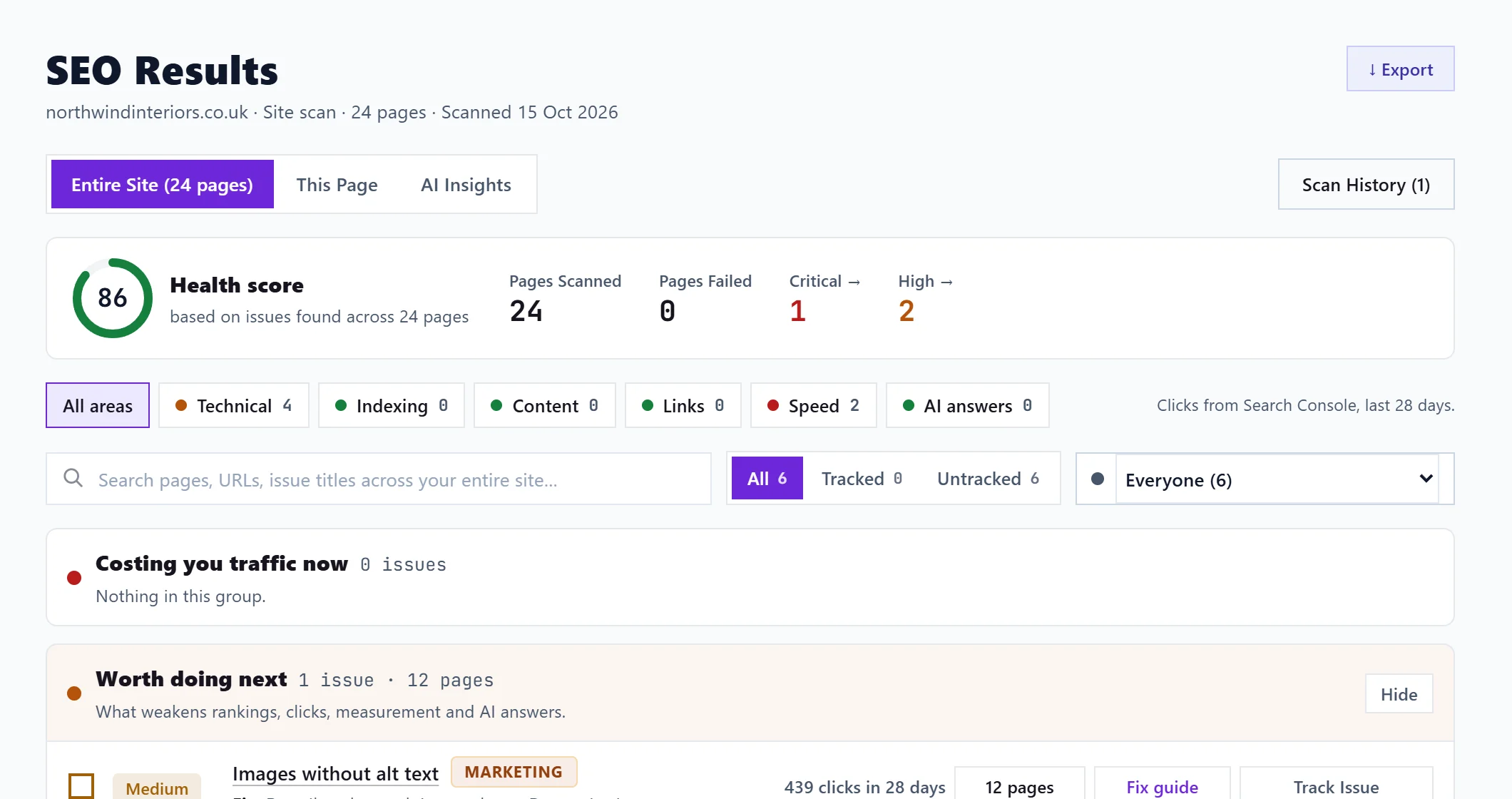
The three views
At the top, switch between:
- Entire Site (N pages): your latest whole-site scan. This is where most people work.
- This Page: one page's results, from a single-page check or a page of the site scan. See the This Page results.
- AI Insights: short written insights from your scan history and the visits AI assistants send you. See the AI Insights tab.
Scan History opens your earlier scans (see scan history) and New scan opens the New Scan page.
The summary strip
- Health score, with "based on issues found across N pages". See the health score explained.
- Pages Scanned and Pages Failed (pages whose fetch or speed test did not come back).
- Critical and High: click either to show only that severity. A label says Showing critical issues only; the cross beside it shows everything again.
- See what changed lists what was Fixed since last scan and what is New since last scan, each with how many pages. If the two scans read very different numbers of pages, it warns you to treat the comparison loosely.
Filter by area
Six areas sit under the strip, each with a status. Click one to show only its findings, or All areas for everything:
- Technical: security, rendering, server errors
- Indexing: sitemaps, robots, canonicals, structured data
- Content: titles, descriptions, headings, text
- Links: broken links, redirects, pages nothing links to
- Speed: loading, layout shift, page weight
- AI answers: whether AI assistants can read and quote you
The findings
Findings are grouped into Costing you traffic now, Worth doing next and Tidy-ups (see what to fix first). Each row shows the severity, the title, who usually fixes it, the fix in one line, how many pages it is on, the Search Console clicks riding on it where known, Fix guide and Track Issue.
- Click the title to open everything about it. See open an issue.
- Tick it, or its pages, as fixed. See mark issues fixed and re-check them.
- Use the search box and filters to narrow the list. See filter and search scan results.
- For title and description findings, Recommend meta opens the Meta Generator for the first affected page. See meta descriptions and titles.
Further down
- Pages Google may see as low value: see page checks.
- Raw export: every finding and every page as CSV or JSON. See export scan results.
Warnings you may see
- Incomplete scan: the scan stopped early, so the score covers only the pages it finished. See scan stuck or failed.
- Site score not improving: shown when site scans of a similar size over the last 30 days show little or no improvement, or a lower score, from the first to the latest.
Questions people ask
The page says "No results yet". What now?
You have not scanned this project yet. Open New Scan and run one.
Do the numbers change when I tick things fixed?
The ticks are saved with the scan and update the fixed counts, but the health score only changes when you scan again.