How do I track a keyword?
On this page
Click the star in front of any keyword on the Keywords page and it is tracked: its position is followed week by week and listed under Track, then Opportunities, Rankings, in Keywords you are tracking. Click the star again to stop. Minimum tracks up to 500 keywords a project, Entrepreneur 1,000 and Enterprise 10,000.
Ways to track a keyword
- From the table: open Analytics, then Keywords, and click the star at the start of the row. A solid purple star means it is tracked.
- A search you do not rank for yet: press Add keyword above the table. It looks the search up first (volume, difficulty, whether you already rank) and lets you put it in a group.
- From Keyword research: press + Track beside any idea. See keyword research.
- From Topic gaps: press Track this search on any search in a cluster. See topic gaps.
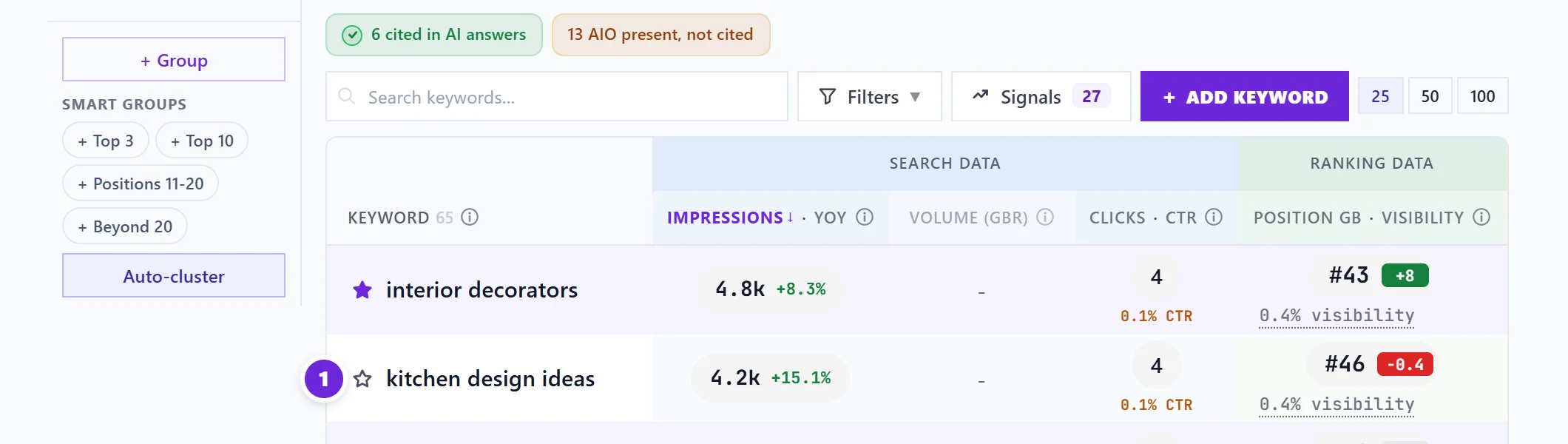
Tracked keywords also collect in a Tracked group on the Keywords page, so you can filter the table to them.
Where to see how they are doing
Open Track, then Opportunities, and choose Rankings. Keywords you are tracking lists each one with its position, the change since the week before, a small trend line and clicks, worst first so whatever needs work is at the top. Click a keyword to open its history, pages and what to do next. Keywords that have not appeared in search yet are counted separately.

These positions come from our weekly copy of your Search Console data, not a live check, so they are as fresh as the last weekly save. A new keyword shows "not yet in the archive" until then.
Alerts
To hear when a keyword enters or leaves the top 10, turn on Ranking movement alerts in Settings, Notifications. They arrive the same morning, by email and in the bell. See choose your emails.
When you reach your limit
The app tells you how many you are tracking, the most your plan allows, and which plan tracks more. Stop tracking keywords you no longer need, or change plan: see plans and prices.
Questions people ask
Does tracking check my position every day?
No. Positions come from Search Console, which reports an average over many searches, and we save it once a week. Weekly figures are steadier and do not chase day-to-day noise.
Can I track a keyword I do not rank for yet?
Yes. Use Add keyword, or + Track in Keyword research. It shows as unranked until Google starts showing your site for it.
Is the limit per project or per account?
Per project. Each project on your account has its own tracked list and its own limit.