How do I find new keywords to target?
On this page
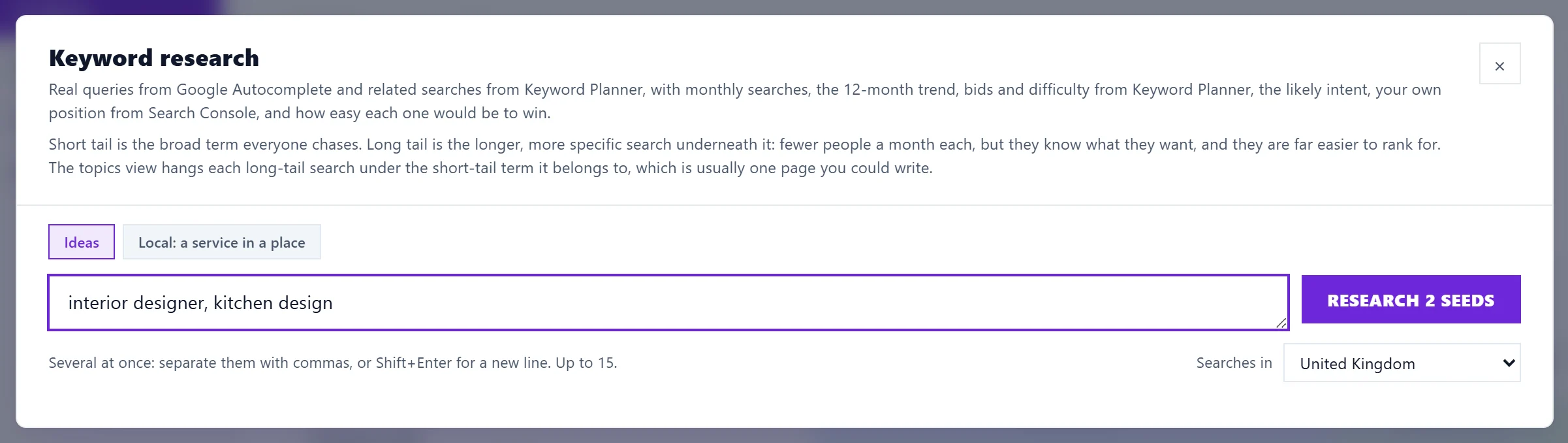
Press Keyword research at the top of the Keywords page, type one or more starting words (seeds), pick the country and press Research. You get the real searches people type around them, with monthly volume, trend, difficulty, likely intent, your current position and whether you already have a page for each one.
Run a search
- Open Analytics, then Keywords, and press Keyword research.
- Type what you do, for example "emergency plumber". For several at once, separate them with commas or press Shift+Enter for a new line, up to 15.
- Set Searches in to your country. Volumes are counted per country, so Worldwide shows none.
- Press Research. The bar under the filters names each step and how many seeds are done. Results appear as soon as the first seed is sorted, and volumes fill in as they arrive.
Reading the results
- Searches: monthly volume from Google's Keyword Planner. Trend shows the last 12 months: Rising, Steady, Falling or Seasonal.
- Difficulty: our estimate from Google's competition and bid figures. Lower is easier.
- Intent: Informational, Commercial, Transactional, Navigational or Local. Use Any intent to show one kind.
- Tail: Short tail, Mid tail or Long tail, so you can go after longer, easier searches.
- Your position: where you already rank, from Search Console.
- Improve /your-page means a page of yours already ranks for this or a very close search. New page means nothing does.
- Related idea: a search from Keyword Planner that does not start with your seed. These need Google Ads connected for the project.
Views, filters and sorting
- The chips across the top filter the list: All, Gaps: not ranking, Already ranking, Questions, Short tail, Long tail, Local and Related ideas. Any intent narrows it to one kind of search.
- View switches between By topic: long tail under its short tail and a Flat list.
- Sort by: Searches, Easiest win, Lowest difficulty, Gaps first, Your position or Least dominated.
- Check who owns page one needs live Google results, which are not switched on for accounts yet, so it says so instead of checking.
For a service in a particular town or city, use the Local: a service in a place tab: see local keyword research.
Suggestions that are not about your site are hidden, for example "rank tracker rocket league" for a rank tracking tool. Click Show them to see them anyway.
Act on an idea
- + Track adds it to your tracked keywords. See track keywords.
- In the topic view, Plan this cluster puts a topic and its searches into your blog plan as posts. See the blog plan.
- Export CSV downloads every idea, with a Seed column when you ran several.
Questions people ask
Where do the ideas come from?
Google Autocomplete (the suggestions Google shows as you type) and, with Google Ads connected, Keyword Planner's related searches. See where keyword data comes from.
Why do the ideas have no volumes?
Google Ads is not connected for this project, it needs reconnecting, or the country is set to Worldwide. The ideas are still real searches. See search volume.
Does keyword research use AI uses?
No. Research and volumes are free on every plan.