What does the GA4 page show?
On this page
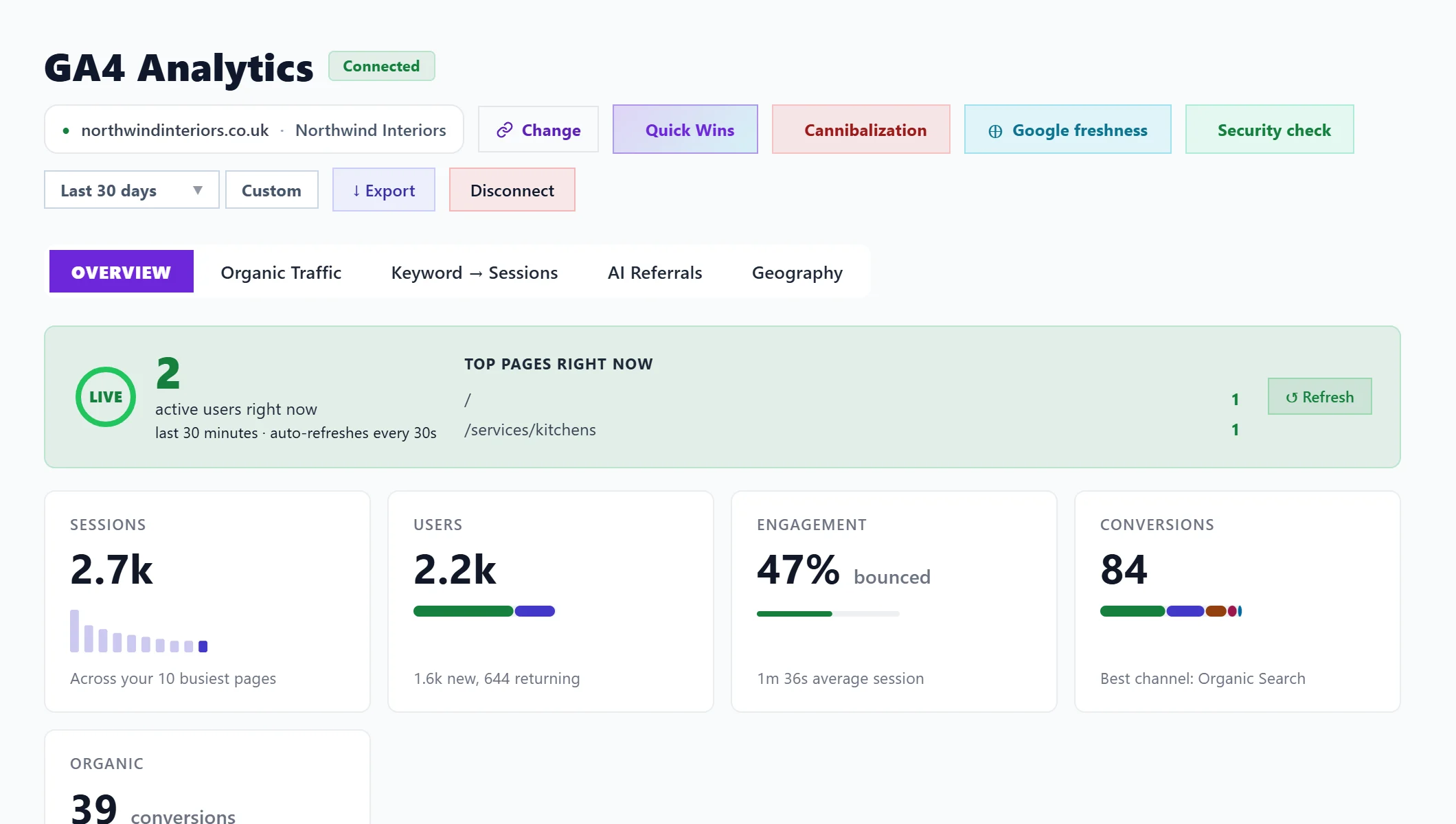
The GA4 tab under Analytics shows your Google Analytics 4 figures beside your Search Console data. Its Overview tab gives visits (sessions), people (users), engagement and conversions for the period, who is on the site right now, where your traffic comes from and your top pages. Four more tabs cover Organic Traffic, Keyword → Sessions, AI Referrals and Geography.
The GA4 page needs a paid plan or a trial, and Google Analytics connected: see connect Google Analytics.
The bar at the top
- Change: which Search Console and Analytics properties the project uses. See one website, one property.
- Quick Wins, Cannibalization, Google freshness and Security check: four checks. See GA4 page checks.
- Date range: a preset or your own dates, up to four years back.
- Export: a CSV of the summary and your top pages.
- Disconnect: stops reading Google Analytics for this project.
Overview, top to bottom
- Active users right now: people on the site in the last 30 minutes, updated every 30 seconds, with their top pages.
- Sessions: visits in the period. One person can make several.
- Users: people, each counted once, split into new and returning.
- Engagement: the bounce rate (sessions that ended without any interaction) and the average session length. Compare it with itself over time rather than with other sites, because it depends on how the property is set up.
- Conversions: the events you have marked as key events in GA4, and Organic: the part from Google search, which is the part SEO can move.
- Where your traffic comes from: sessions and users by channel (organic search, direct, referral, social and the rest) against the period before. Press See every channel for the full list.
- Conversions by Channel, Top Converting Pages (Organic) and Top Pages.
Bot traffic left out
Some sites get floods of fake visits counted as Direct. When one place and one browser send a large share of Direct visits that never interact, they are left out of the channel figures, and a line names exactly what was left out so you can check. Anything subtler is shown, not guessed at.
Alerts at the top
If Google search clicks dropped sharply in the last week, Traffic drop detected shows the size of the drop, the pages losing most, and Google updates in that window. Diagnose the worst page explains one page. A written diagnosis is on Entrepreneur and Enterprise. If organic traffic is down over your period, Find out why opens What changed in Track.
Questions people ask
Conversions say none are configured. What do I do?
In GA4, open Admin, then Events, and mark the events that matter (a form sent, a call clicked) as key events. They show here from then on.
Why do sessions and Search Console clicks differ?
A click is counted by Google when someone clicks your result; a session is counted by Analytics when the page loads with its tracking tag. Blocked cookies, quick exits and tag problems all make them differ. See organic traffic and keyword sessions.