How do I filter the Keywords table and use Signals?
On this page
Above the Keywords table, type in Search keywords to find searches containing a word, press Filters to narrow the table to a group such as Improved or Quick wins (11-20), and press Signals to see what moved since the previous period: keywords that entered or left the top 10, big climbs and drops, and searches whose demand jumped or fell.
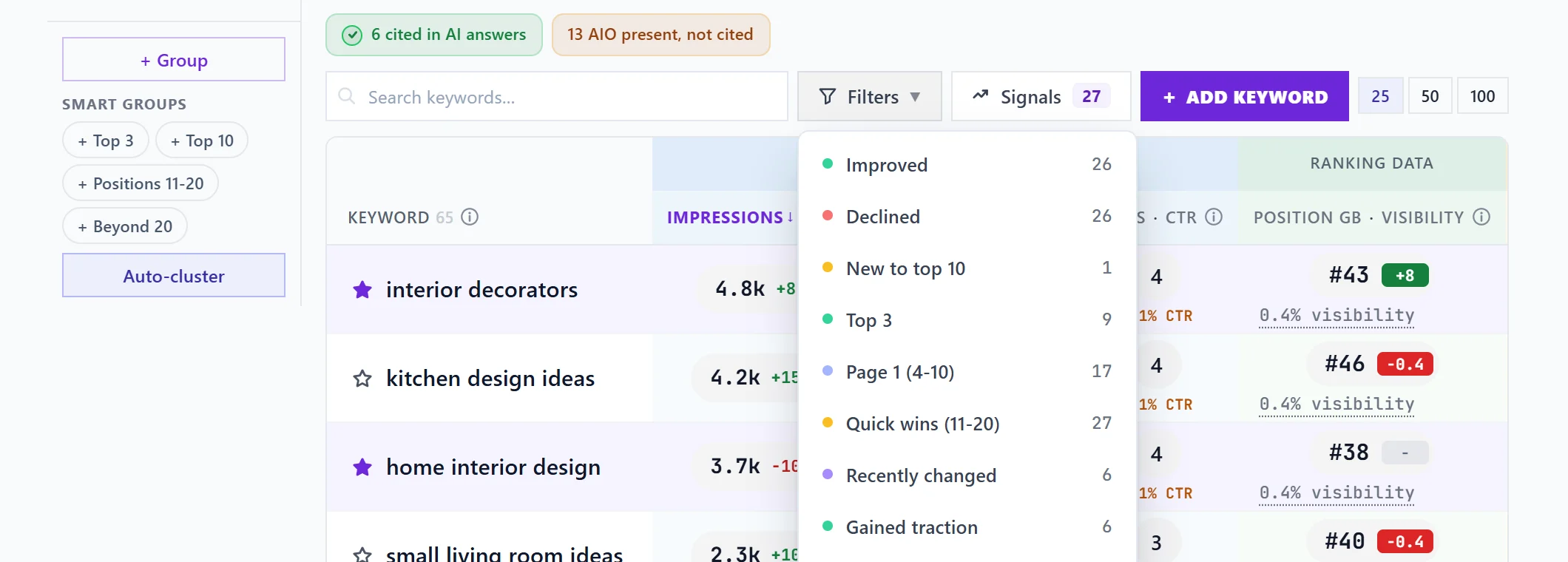
Filters
Press Filters and pick one. Each shows how many keywords it holds; filters with none are not listed. Hover over a filter for exactly what it counts.
| Filter | Keywords that... |
|---|---|
| Improved | moved up against the previous period |
| Declined | slipped against the previous period |
| New to top 10 | moved into the top 10 since the previous period |
| Top 3 | rank 1 to 3, with 5 or more impressions |
| Page 1 (4-10) | rank 4 to 10, with 5 or more impressions |
| Quick wins (11-20) | rank 11 to 20, with 50 or more impressions: just off page one |
| Recently changed | had impressions up or down 30% or more (at least 20 impressions) |
| Gained traction | had impressions up 30% or more |
| Losing traction | had impressions down 30% or more |
| Best-ever rank | are at their best average position in your history |
| In AI Overview | show with a Google AI Overview your site appears in (only listed when there is AI Overview data to go on) |
The filter in use, a group, a search or a page filter show in a Filtered by line under the bar. Press the cross on one to remove it, or Clear all.
Search
Search keywords filters the table as you type. It works with filters and groups together.
Signals
Signals opens a panel of what changed against the previous period, with the number of movements on the button. Choose All, Declines, Gains or Demand:
- Left top 3, Left top 10, Big drop: rankings that fell.
- Entered top 3, Entered top 10, Big climb, Best ever: rankings that rose. A big climb or drop is 5 places or more.
- Demand up, Demand down: searches whose impressions moved sharply.
Signals with real clicks at stake come first, and a position measured on fewer than 10 impressions is not counted. Click a keyword to open its details. Why did ... change lists what else changed at the same time, such as a Google update that landed in the period. Google never says why a ranking moves, so these are things that happened together, not causes.
Other controls
- 25, 50, 100: rows per page.
- Add keyword: track a search you may not rank for yet. See track keywords.
- Ignored (N): keywords you have left out, with Stop ignoring.
Questions people ask
A sort does nothing when I click it. Why?
Every keyword in view has the same value for that column, so there is nothing to reorder. The app says so; pick another column.
Why is a filter missing from the list?
It would show no keywords this period, so it is hidden until it has some.