What does the Google Ads page show?
On this page
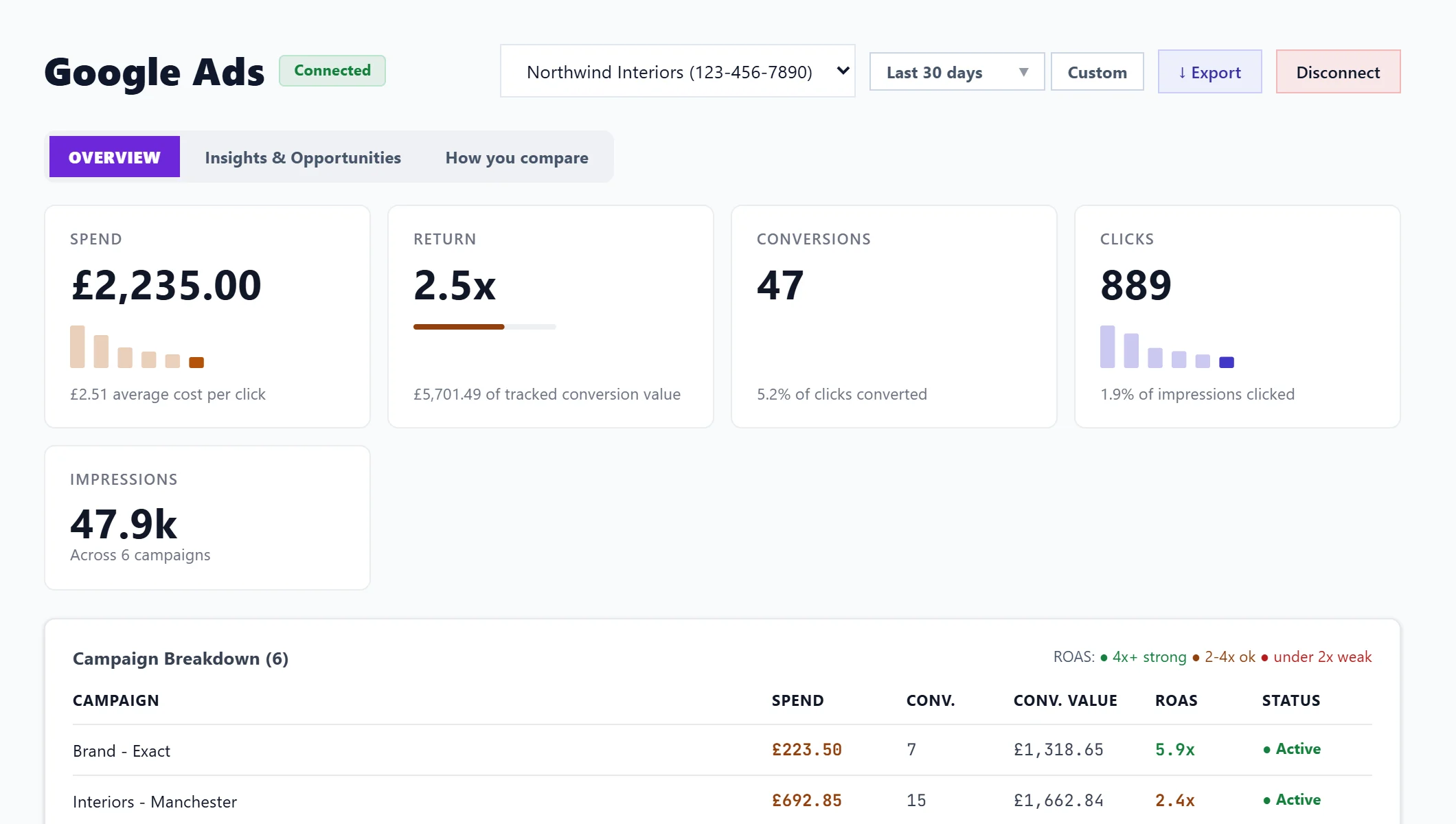
The Google Ads tab under Analytics reads your Google Ads account and shows what your ads cost and earned in the period: spend, return, conversions, clicks and impressions, then each campaign. Two more tabs, Insights & Opportunities and How you compare, show where money is wasted and how often your ads show against competitors. It is read only: UtilitySEO never changes your campaigns.
The page needs a paid plan or a trial and Google Ads connected. See connect Google Ads. If your login can see several Ads accounts, pick one from the account menu at the top; the choice is saved for the project.
You do not need to run ads to connect Google Ads: it also gives you free search volumes on the Keywords page. With no campaigns, this page simply has nothing to show.
The cards
- Spend: what your campaigns cost in the period, with the average cost per click. The bars are your biggest spending campaigns.
- Return: conversion value for every £1 spent, or one unit of your account's currency (return on ad spend). The bar is measured against 4x, a common target rather than a rule. Under 1x, See what to cut opens Insights & Opportunities. This is only as good as your conversion tracking: revenue you do not track counts as none.
- Conversions: conversions Google Ads recorded, and the share of clicks that converted.
- Clicks: clicks on your ads, and the share of impressions that were clicked.
- Impressions: times your ads appeared. Impressions cost nothing; clicks are what you pay for.
Campaign Breakdown
Each campaign with spend, conversions, conversion value and status, coloured by return: 4x+ strong, 2-4x ok and under 2x weak.
When campaigns show nothing
If campaigns are live but have no impressions, the page asks Google why. Most often, the account has no approved billing setup, and it tells you to add or verify your payment method in Google Ads under Billing. Otherwise it lists the reasons Google gives, or says nothing in the setup is stopping it and new ads may still be waiting on Google.
Dates and export
Pick the period with the date button; Google Ads data goes back up to four years. Export downloads a CSV of the summary and campaigns.
Questions people ask
Why do your figures differ slightly from Google Ads?
Conversions are counted against the day of the click that led to them, so a recent conversion can appear on an earlier day. Figures are read from Google each time you open the page.
Can UtilitySEO pause a campaign for me?
No. The connection is read only. Recommendations tell you exactly what to change in Google Ads yourself. See Insights & Opportunities.