How do I build a 30, 60 or 90 day SEO plan?
On this page
Open Track, then Plan. Choose how long under How long (30 days, or 60 and 90 days on Enterprise), press Do it for me to have the searches with the best payback picked for you, or tick searches yourself, then press Make the plan. You get weekly tasks built from your own Search Console searches: which page, what to change and where to link from.
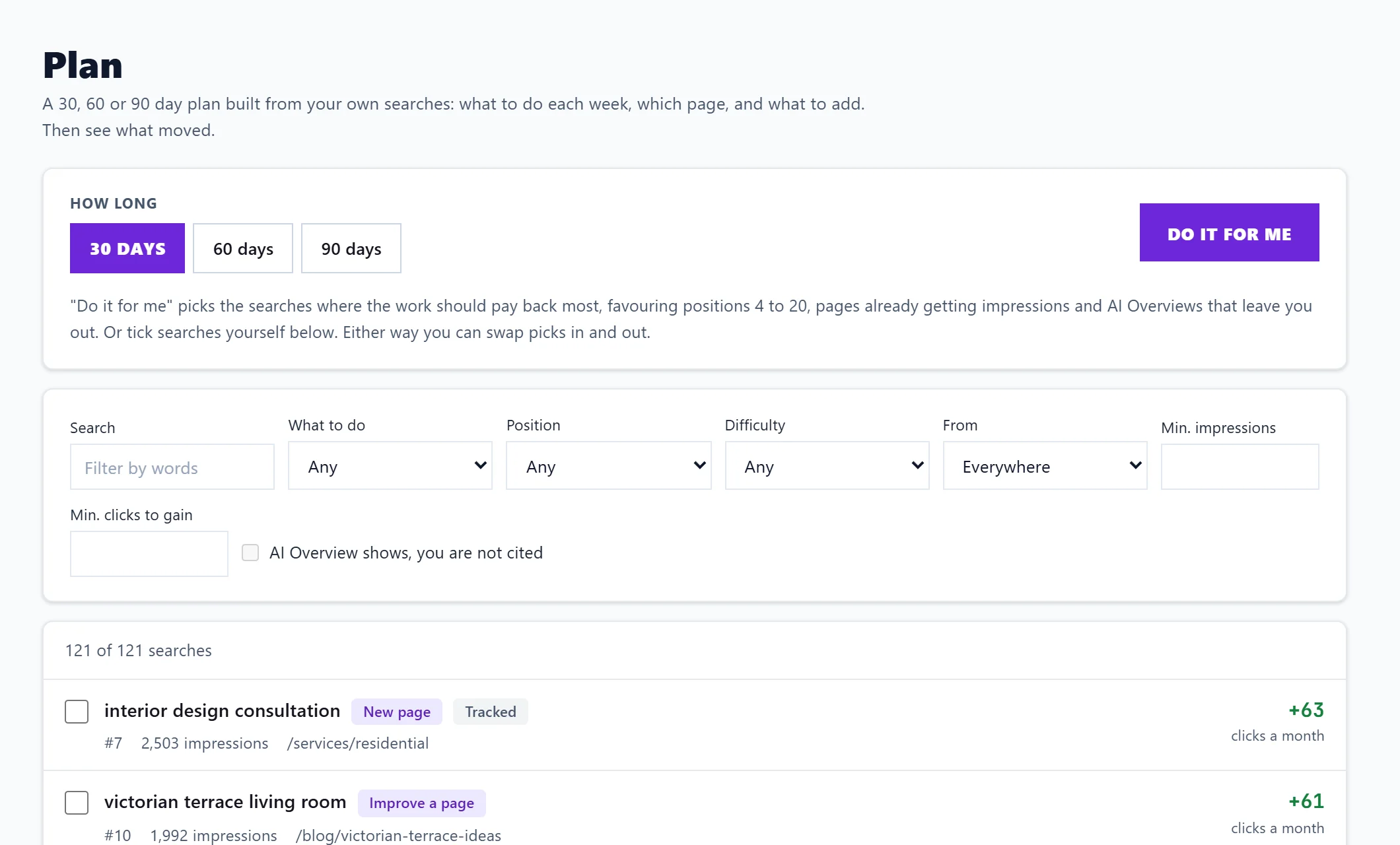
Pick the searches
The list holds the searches your site already shows for, plus searches from your opportunities, the keywords you track, topic scans and competitor gaps. Each row shows the search, what kind of job it is, your position, impressions or monthly searches, the page, and the clicks a month it could gain (or no estimate).
Do it for me picks the searches where the work should pay back most. It favours positions 4 to 20, pages already getting impressions, and searches where Google shows an AI Overview that leaves you out. Each pick shows a one-line reason, such as "Two of your pages split this search". You can untick any pick or tick others.
To narrow the list, use the filters:
- Search: filter by words.
- What to do: Improve a page, New page, Merge competing pages or Rewrite the search result.
- Position: Top 3, 4 to 10, 11 to 20 or 21 to 30.
- Difficulty: Easy, Medium or Hard.
- From: Opportunities, Tracked, Topic gap or Competitor gap.
- Min. impressions and Min. clicks to gain.
- AI Overview shows, you are not cited: only works once we hold AI Overview checks for your searches.
Add to plan on an Opportunities card opens this page with that search already picked.
Make the plan
The bar at the bottom shows how many searches you picked, the estimated clicks a month, and how many of the plan's work slots they use. Each kind of task takes a different amount of work: a title and description rewrite is quick, a new page or a merge takes most of a day. If you pick more than the plan length holds, it says so and what does not fit is left out; choose a longer plan or fewer searches.
Press Make the plan. Quick wins come first; new pages and merges never go in the first week. Then see follow your plan and see what moved.
Questions people ask
Why can I not choose 60 or 90 days?
Longer plans are on Enterprise. A 30-day plan is on every paid plan.
What does no estimate mean?
We only estimate clicks from your own Search Console figures. A search without enough data has no estimate and adds nothing to the totals, but you can still plan it.
Why does it say No searches to plan yet?
Search Console has no searches with enough impressions yet. Run a topic scan finds searches you could win next; see topic gaps.
Does it use AI uses?
No. Plan uses your own data and no AI uses.