How do keyword groups, smart groups and Auto-cluster work?
On this page
Groups sit in the Groups rail beside the Keywords table. Click a group to filter the table to it. Make your own with + Group, add a ready-made smart group such as Top 10 that updates itself, or press Auto-cluster to have UtilitySEO sort your keywords into topic groups for you (Entrepreneur and Enterprise, one AI use).
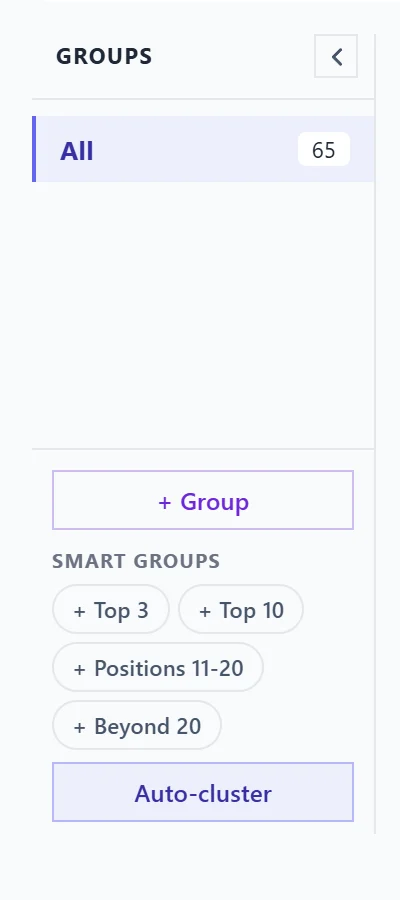
The groups rail
- All shows every keyword, with the count beside it.
- Tracked holds every keyword you have starred. It always matches your tracked list.
- Your own groups and smart groups follow, each with its keyword count.
The arrow at the top folds the rail into a thin strip to give the table more room. On a phone, the rail opens from the Groups button above the table.
Make your own group
- Press + Group at the bottom of the rail.
- Type a name and press Create.
- Click the new group, then Manage keywords. Search your keywords and add them, or move a keyword to another group.
In the manage panel you can also rename the group (click its name) or Delete it. AI suggest suggests more keywords that belong in the group; it is on Entrepreneur and Enterprise and uses one AI use. Delete group in the rail removes the group but not the keywords.
Smart groups
Under Smart groups are four one-click groups: Top 3, Top 10, Positions 11-20 and Beyond 20. They have no list to manage: membership is the rule, so a keyword moves in and out as its position changes. Once added, a smart group drops out of the list so you cannot add it twice.
Auto-cluster
- Press Auto-cluster at the bottom of the rail.
- Press Cluster with AI. It reads your keywords, groups them by topic and what the searcher wants, and joins topics that match. You need at least two keywords.
- Look through the topics it found. Press + Add group on the ones you want, or use all of them: Add to my groups keeps your existing groups, and Replace my groups swaps them out.
- Re-run tries again.
Auto-cluster is on Entrepreneur and Enterprise and uses one AI use each time it runs. On other plans the button shows a lock. See AI uses explained.
Questions people ask
Do my groups follow me to another computer?
Yes. Groups are saved with the project on our server, not only in your browser. If a save fails, the app tells you so you can make the change again.
Do groups change what is tracked?
No. Only the star tracks a keyword. Groups are a way to view the table.
Can I export one group?
Yes. Select the group, then press Export: the file holds what the table shows. See country, dates and export.