How do I compare my brand with competitors in AI answers?
On this page
Open Analytics, AI Visibility, then the Comparison tab. It puts your brand and each competitor in one table, read from the same AI answers: how often each is named, its share of voice, where it usually appears in the answer, and how far ahead or behind you it is. Click a row to see the questions where a competitor was named instead of you.
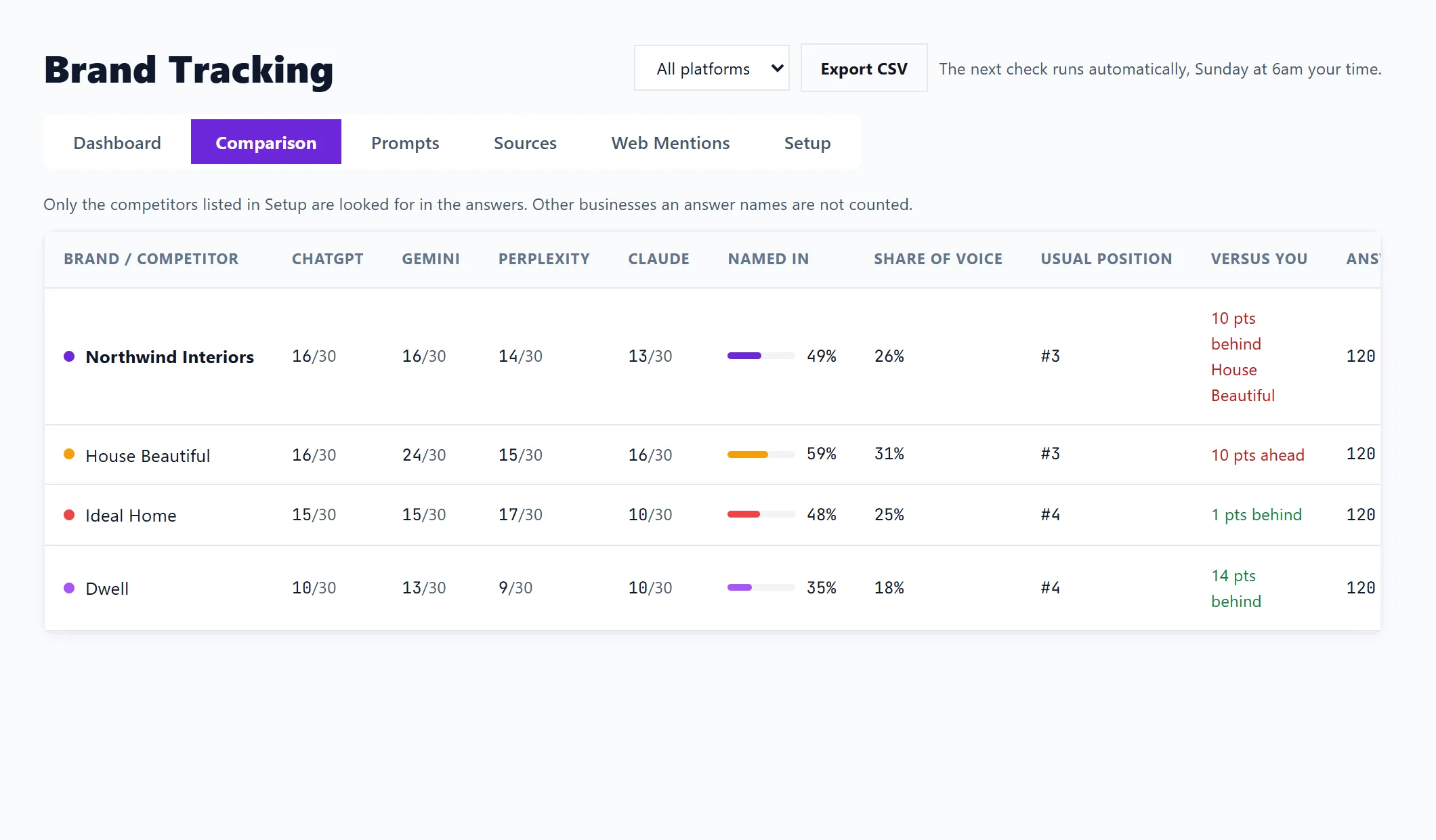
Only the competitors listed in Setup are looked for in the answers. Other businesses an answer names are not counted. See how the checks work to add competitors.
The columns
| Column | What it means |
|---|---|
| Brand / Competitor | Your brand and each competitor. |
| One column per assistant | How many of that assistant's answers named it. |
| Named in | The share of all answers checked that named it. Everyone is asked the same questions, so this compares fairly. |
| Share of voice | Of all the times any brand here was named, the share that were this one. |
| Usual position | Where it is usually listed when it is named. #1 means first. |
| Versus you | How many points more or less often it is named than you. On your own row: how far behind the leader you are, or Leading. |
| Answers | How many answers the row is based on. Under 10 is marked as too few to trust yet. |
Use the platform filter at the top of the page to compare on one assistant only.
Open a row
Click a competitor to see Named instead of you: the questions where the answer named them and not you, with how many answers. Click your own brand to see Questions that left you out. To be named in these, answer each question directly on a page of your own site, and get listed on the pages AI answers cite for them: see where AI gets its answers.
From the Dashboard, See where a leading competitor wins opens this tab on that competitor.
Questions people ask
A competitor I know about is missing. Why?
It is not listed in Setup. Add its name there and save; it is looked for from the next weekly check.
What does "(few)" beside a figure mean?
That row is based on fewer than 10 answers, which is too few to trust yet. It firms up as weekly checks add up.
Can I download the comparison?
Export CSV at the top of the page downloads each brand and question with mentions and checks, following the platform filter.