How do I write a blog outline in the Writer?
On this page
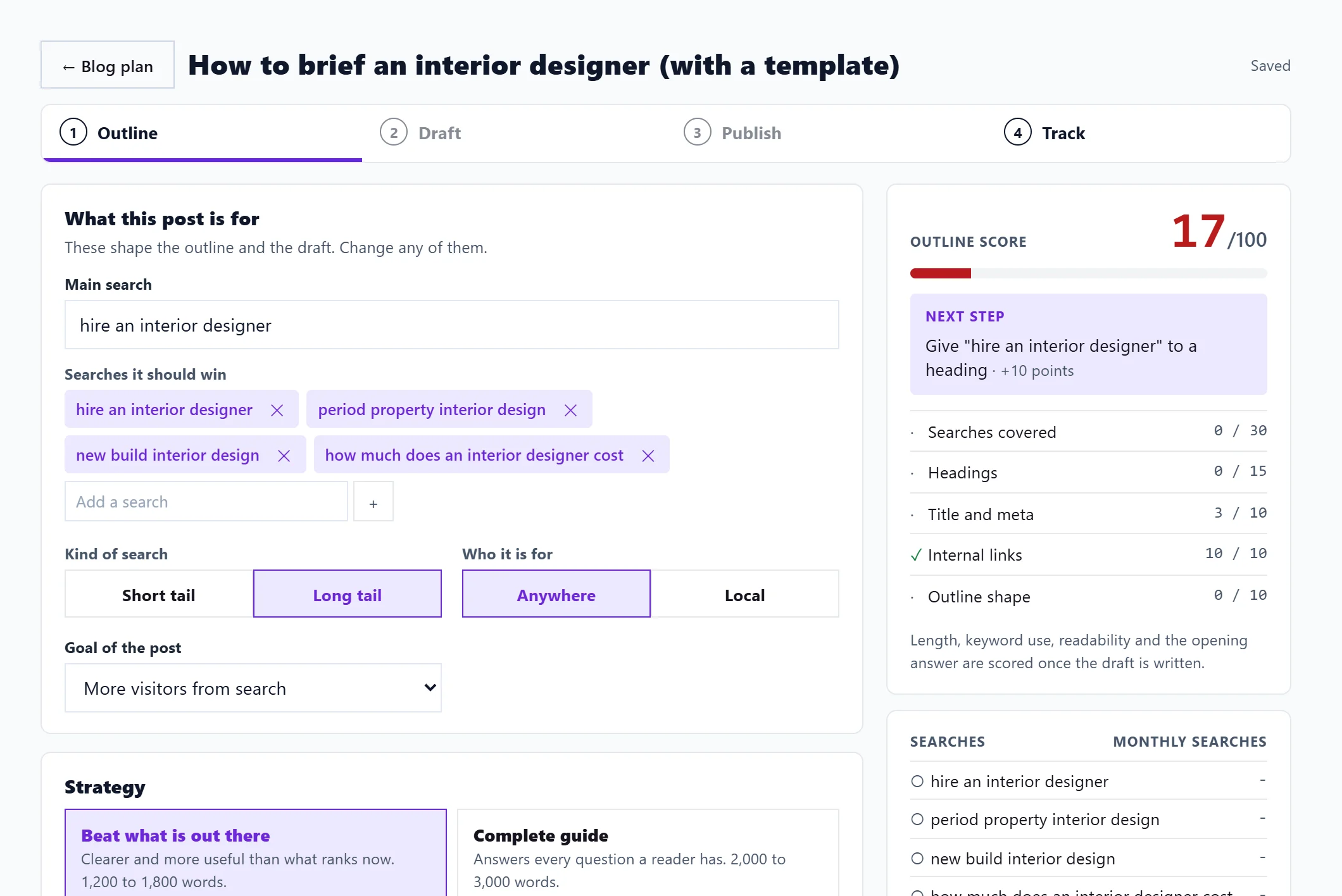
Open a post from Content, Blog Plan (or start one with Write a post). It opens on Outline, step 1 of the Writer. Check the searches the post should win, pick a Strategy, then press Write the outline for me. It plans the title, headings, the searches each heading covers and the FAQs, for free. Edit anything; it saves as you go and the Outline score updates beside it.
Outline writing is on Entrepreneur and Enterprise and uses no AI uses or Growth blogs. On Minimum the button shows a lock, but you can still build an outline by hand with Or start with a blank heading.
What this post is for
- Main search: the search the post is built around.
- Searches it should win: the related searches, with monthly searches where known. Remove any, or Add a search.
- Kind of search: Short tail or Long tail.
- Who it is for: Anywhere or Local, with a Town or region.
- Goal of the post.
Strategy
Pick one:
- Beat what is out there: clearer and more useful than what ranks now. 1,200 to 1,800 words.
- Complete guide: answers every question a reader has. 2,000 to 3,000 words.
- List or round-up: one heading per item, easy to scan. 1,500 to 2,500 words.
- Comparison: you against one named alternative, set under Compared with. 1,200 to 1,600 words.
Edit the outline
- Title and how it shows in Google: the Title (H1), Meta title and Meta description, each with a character count.
- Headings: each becomes a section. Give each the searches it should cover, a few points on what it covers, and subheadings with + Subheading. Reorder with the arrows; add with + Add heading (up to 12).
- FAQs: questions people ask, which become an FAQ section Google and AI answers can quote. Add with + Add a question (up to 8).
- Settings (press Change): Writing style (Your site's voice, Professional, Friendly or Expert), Pages on your site to link to (from your site scan and published posts), and Extra guidance for the writer (optional), such as "Prices in pounds".
Next
At the bottom, Happy with the outline? offers Rewrite the outline (free) or Write the draft, which uses 1 Growth blog. The number of Growth blogs you have left shows under the button. See write and edit the draft and the post score.
Questions people ask
Is there a limit on free outlines?
There is a fair-use limit per account per day. If you reach it, edit the outline by hand or try again the next day.
Where does the save message come from?
The top of the Writer says Saved, Saving or Add a title to save. An outline needs a title before it can save.