How do I use the UtilitySEO API?
On this page
The UtilitySEO API lets your own software start site scans and page scans of one project's website and read what the scan found: health score, issues, the pages each issue is on, fix guides, page speed and more. Create a key in Project settings, on the API keys tab, and send it as a Bearer token. It returns crawler data only, never Search Console, Analytics or Ads data, and nothing about your account.
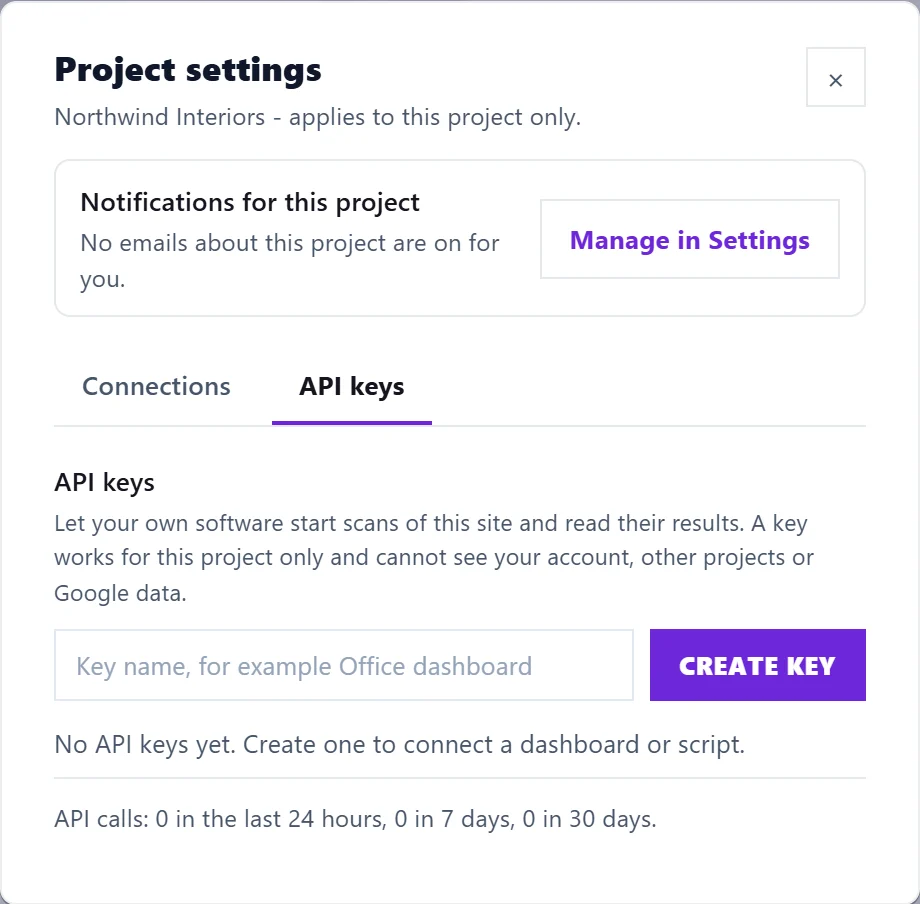
Create a key
- On the Projects screen, press the cog on the project to open Project settings.
- Open the API keys tab. Only the owner and Full Access members can create keys.
- Type a Key name, for example "Office dashboard", and press Create key.
- Copy the key straight away. It is shown once and we cannot show it again. It starts with
usk_live_.
The tab lists each key with when it was created and last used, and how many calls were made in the last 24 hours, 7 days and 30 days. Press Revoke to stop a key at once.
Use it
Send the key on every request, from your own server:
Authorization: Bearer usk_live_...The address is https://utilityseo-production.up.railway.app/api/v1. Main requests:
| Request | What it does |
|---|---|
GET /project | The project the key belongs to and its page limit |
POST /scans | Start a site scan or a one-page scan |
GET /scans/{id} | Where a scan has got to |
GET /scans/{id}/results | Health score, issues, speed and other findings |
GET /scans/{id}/export/findings and /export/pages | Every finding and page, as rows |
GET /scans | Past scans, including ones started in the app |
GET /guides | The Fix Guides, in English, German or Dutch |
PUT /webhook | Be told when a scan finishes. See API webhooks |
Your developer can ask support@utilityseo.com for the full reference, with every field and example answers.
Limits
- Scans count against your plan, the same as in the app: site scans a day (3 on Minimum, 5 on Entrepreneur, unlimited under fair use on Enterprise) and pages per scan (500, 2,000 or 10,000).
- One site scan and one page scan per project at a time.
- Per key: 60 requests a minute and 10 scan starts an hour.
- The API works while your account has a paid plan or a running trial.
What a key cannot do
- See any other project, your account, your billing or your Google data.
- Be used from a web page in a browser. Keep it on your server.
- Schedule scans. UtilitySEO does not run scans on a timer; call
POST /scansfrom your own scheduler, for example once a week.
Questions people ask
What is the difference between an API key and a connector key?
An API key is for your own software and belongs to one project. A connector key, from Settings, Account, Connect your own AI, lets your own Claude or ChatGPT read your whole account. See use UtilitySEO in Claude or ChatGPT.
My key stopped working. Why?
It was revoked, the account was closed, the trial ended without a plan, or the person who made it no longer has owner or Full Access rights on the project. See API errors.
Is there an api.utilityseo.com address?
Not yet. Use the address above.